Write-ahead log (WAL)

When a database tells us a transaction has committed, we take it at its word. The money was transferred. The order was placed. The medical record was saved. We expect that data to survive a crash, a power outage, or a reboot.
That expectation is called durability. It is one of the ACID guarantees that databases are famous for. Like other ideas in computing, it sounds simple until you look closely. Then you find a chain of careful engineering decisions, each trading off speed against safety.
The WAL is at the center of most of those decisions. The idea is straightforward. Before a database reports that a transaction succeeded, it writes a record of the change to a log. But making that idea work in practice means dealing with operating systems, storage hardware, record formats, and corruption. Different systems make that bet differently.
Logs
A log is one of the simplest data structures there is. It is an ordered, append-only sequence of records. We use logs in server software, audit systems, and error reporting. In a database, a log is more than debugging. It is the source of truth.

The order of records matters because a log is a timeline. If you know every event that happened, you can reconstruct the state. This is why logs survive crashes better than indexes or tables. A half-written index page is ambiguous. A log with the last record incomplete is not. You replay up to the last complete record and stop. Records are never overwritten, so there is no partially updated state to reason about.
A database could write changes directly to its main files, but those files are optimized for reading. They have pages, indexes, and free-space maps. Updating them is complex and slow. A log is optimized for one operation. Append.
Append is fast, simple, and durable. Because the log only grows at the end, writes are sequential. Sequential writes avoid the seek penalty of spinning disks and reduce write amplification on SSDs. This is why append-only logs outperform random updates.
Write-ahead logging
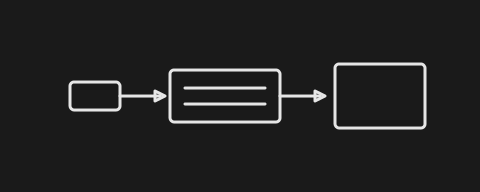
Every insert, update, and delete becomes a WAL record. The record is the unit of durability. It holds a transaction ID, an operation type, and the changed data. It is enough information to redo the operation later.
For example, a record might say that transaction 42 changed row 123 in the users table. It updated the name from Alice to Bob. After a crash, the database can replay that record and restore the change.
WAL records are small. A single row change might touch a few hundred bytes. Updating the main table file would mean reading and writing an entire page, plus updating every index that points to that row. A page is a fixed-size block of data. 4 KB and 8 KB are common sizes. The log absorbs the change cheaply.
The record goes to the log first. Only then does the transaction count as committed.
Commit is a contract. Before commit, the user can still change their mind. After commit, the database must keep its promise. The WAL record is that promise in writing.
The WAL holds the truth. Once a transaction commits, its data is visible even before it reaches the main database files. Readers can look in the WAL.
Checkpoints

Eventually the WAL has to reach the main database files. That happens during a checkpoint. A checkpoint copies committed changes from the log into the database.
Checkpoints do not run on every commit. That would be too slow. They fire when the WAL grows beyond a size limit or when enough time has passed. SQLite defaults to 1000 pages of WAL data. PostgreSQL has its own thresholds. The exact numbers do not matter as much as the pattern.
If checkpoints never ran, the WAL would grow forever. Recovery would take forever. Disk space would disappear.
Checkpoints do not stop the world. While the checkpoint copies pages to the database file, new transactions keep writing to the WAL. The checkpoint records a position in the log. Recovery knows that everything before that position has been copied. Everything after still needs to be replayed.
The path to persistent storage
Writing to disk sounds final. It is not.
Between your application and persistent storage sit three layers of volatile memory. Each one can lose data.
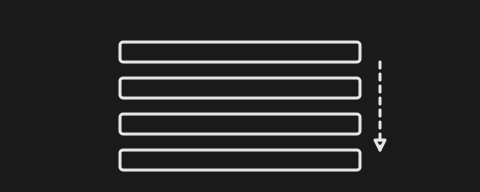
Each layer is a place where data can disappear.
- WAL buffer. This is application memory. Records land here before anything else. A crash here wipes them out. It is the fastest layer and the least safe.
- Operating system page cache. A
write()call puts data here. The OS decides when to flush it. Maybe now. Maybe in a minute. Withoutfsync, the decision is not yours. The page cache is seductive.write()returns quickly because it only copies data into kernel memory. The OS can reorder writes, merge them, and delay them. This is great for performance and terrible for durability. - Storage device cache. Disks and SSDs buffer writes too. Unless the cache is battery-backed, a power loss destroys it. Some disks even lie about
fsync, reporting success before the data is truly safe. The database has to know this and compensate.
Only the last layer counts. That is the physical disk, the flash cells, the platters. Once data lives there, it survives power loss. The word durable means reaching persistent storage. Nothing else counts.
Developers learn this the hard way. They call write(). They call flush(). They think the data is safe. It is only in the page cache. A power outage erases it. The database has to force the data through every layer. The tool for that is fsync.
fsync strategies
The only operation that forces data all the way to persistent storage is fsync. It is also expensive.
fsync blocks. It waits for the physical disk. Milliseconds, sometimes seconds. In database time, that is an eternity. The slowness comes from hardware. A spinning disk has to seek the right track and wait for the platter to rotate. An SSD has to erase blocks before writing new data. The operating system may also have to flush other dirty pages that happened to be waiting.
So every database faces the same question. When do you call fsync?
Immediate persistence
With immediate persistence, every write calls fsync and blocks until the data reaches persistent storage before returning success.

The guarantee is the strongest possible. If the system crashes, you lose at most the operation in progress. Everything before that is safe.
The cost is brutal. A thousand writes mean a thousand fsync calls. Threads wait. Throughput dies. Disk I/O becomes the bottleneck.
Immediate persistence is the right choice when you cannot afford to lose anything. Financial ledgers, medical records, anything where a missing row is a lawsuit.
Batch persistence
With batch persistence, the system buffers records in memory and calls fsync once for the whole batch.

The speedup is large. A thousand appends become memory operations. One fsync saves them all. Sequential writes are also kinder to disks than scattered tiny writes.
But the group is the unit of safety. A crash before the fsync loses the whole group. The batch size becomes a dial. Smaller batches lose less data but call fsync more times. Larger batches amortize the cost but widen the loss window. There is no free setting.
Batch persistence fits systems where operations already belong together. A logging service, a metrics pipeline, a job queue. Losing the batch is bad, but losing one record out of a batch is worse because it leaves the system inconsistent.
Interval-based persistence
With interval-based persistence, a background thread handles the fsync at fixed intervals or when the buffer reaches a size threshold.

The main thread appends and returns immediately. A separate thread writes and fsyncs every second, or every megabyte. Writes never block. Throughput is excellent.
The buffer size and timer interval are the two main dials. A 1MB buffer with a 1-second timer is a common starting point. If the buffer fills before the timer fires, the thread flushes early. If the timer fires first, it flushes whatever is there. Either condition can trigger the sync.
The risk is bounded and known. You might lose the last two seconds of data. The timer is a promise to the user, not a guarantee from physics. If the database crashes one millisecond before the next sync, that data is gone. The user knows the window and accepts the bet.
Interval persistence fits systems where throughput matters more than individual records. Click streams, analytics events, sensor data. The user cares about the aggregate, not the single event. A two-second window of loss is acceptable.
Each approach chooses a different answer to the same question. How much data can I afford to lose? There is no best approach. Only the right trade-off for your system.
Record structure
The log file itself has to be defensive.
Disks fail. Power cuts out mid-write. Silent corruption happens more than developers want to believe. The WAL has to detect corruption, not assume the data is intact.

The first instinct is JSON. It is readable and familiar. But it is the wrong tool for a WAL.
- It has no record boundaries. A corrupt byte can fake a closing brace or a newline.
- It is larger than binary.
- It is slower to parse.
- It has no built-in way to prove the bytes are intact.
Production systems use a binary format. Every record starts with a fixed-size header. The header says how long the record is. Recovery reads the length, reads exactly that number of bytes, and moves on. No guessing. No scanning for delimiters.
The length field is the most important byte in the record. It turns an unstructured stream into a sequence of discrete facts. A corrupt length field is fatal. If the header is damaged, recovery does not know the record size and has to stop.
The header carries a checksum. Before writing, the database hashes the bytes. After reading, it hashes again. A mismatch means corruption. Stop. Or skip. But do not trust.
When corruption is detected, the database has a choice. It can truncate the log at the bad record and continue, losing everything after that point. Or it can halt and ask an administrator to decide. The right choice depends on the system. A banking database should halt. A metrics database might truncate and keep going.
The checksum covers the entire record, not only the payload. A flipped bit in the header is as dangerous as a flipped bit in the data. The database has to distrust every byte.
The transaction ID groups records from the same transaction. This is how atomicity survives a crash. Either the whole transaction replays, or none of it does.
CRC32 is a common checksum. It is fast, and hardware accelerates it. It catches bit flips and burst errors. That is all you need for accidental corruption.
Conclusion
When a database says committed, it is not saying magic happened. It is saying the system paid the cost you agreed to pay.
The WAL is where you write down the terms.